
The gaming chair market is flooded with options claiming to fix your posture, boost your performance, and cradle you through 12-hour raid marathons. Most of them are rebranded office chairs with flashy stitching. The Razer Iskur isn’t one of those.
Launched initially in 2020 and refined through iterative updates, the Iskur carved out a niche by doing something competitors mostly ignore: treating lumbar support like an actual feature instead of a throwaway pillow. It’s built around a fully adjustable internal lumbar curve that moves with you, not against you. But does that engineering translate to comfort during long sessions, or is it overkill? And in 2026, with brands like Secretlab and Herman Miller pushing their own ergonomic innovations, does the Iskur still hold up?
This review digs into real-world performance, build quality, and whether the premium price tag makes sense for your setup.
Key Takeaways
- The Razer Iskur gaming chair features a fully adjustable internal lumbar curve that can be dialed across a 26-degree range, setting it apart from competitors that treat lumbar support as an afterthought.
- Premium build quality with a steel-reinforced frame, aluminum alloy base, and high-density foam cushioning (55 kg/m³) means the Iskur resists wear and maintains support through long gaming marathons.
- The Razer Iskur is ideal for players between 5’6″ and 6’2″ with lower back concerns who spend 6+ hours daily gaming, but may feel too narrow or firm for larger frames or those preferring plush seating.
- At $549.99 USD, the Iskur undercuts ergonomic office chairs like the Herman Miller Embody by half while offering comparable lumbar customization, though it lacks multiple size options found in competitors like the Secretlab Titan Evo.
- The 4D adjustable armrests and smooth 139-degree recline function support various gaming positions without mechanical interference, making it practical for both competitive focus and relaxed gameplay.
- After 18+ months of daily use, the synthetic leather upholstery shows minimal cracking or peeling, and the lumbar mechanism continues adjusting smoothly, backed by a 3-year manufacturer’s warranty.
What Makes the Razer Iskur Stand Out?
Unique Lumbar Support System
Most gaming chairs treat lumbar support as an afterthought, a pillow you strap on and forget. The Iskur flips that. Its fully adjustable lumbar support curve is built directly into the backrest, controlled by a piston mechanism that lets you dial in the exact amount of forward pressure you need.
The curve can be adjusted across a 26-degree range, which sounds technical but translates to noticeable real-world difference. You’re not just pushing a pillow into your lower back, you’re contouring the entire chair to match your spine’s natural shape. It’s closer to what you’d find in high-end office ergonomics than typical gaming chair gimmicks.
This system works particularly well for players who alternate between upright focus during competitive matches and relaxed recline during story-driven games. The lumbar adjusts independently of recline angle, so support stays consistent no matter how you’re sitting.
Premium Build Quality and Materials
Razer didn’t cut corners on construction. The frame is steel-reinforced, rated to support up to 299 lbs. The base is aluminum alloy rather than the plastic often found in mid-tier chairs, and the casters are coated to protect hardwood floors and roll smoothly on carpet.
The upholstery uses multi-layered synthetic leather with a high-density cold-cure foam core. It’s not real leather, but it’s breathable enough to avoid the swamp-ass problem that plagues cheaper PU materials. The stitching is dense and double-reinforced at stress points, armrest joints, seat edges, and lumbar housing.
Razer rates the Iskur’s foam at 55 kg/m³ density, which sits in the premium range for gaming chairs. That means the cushioning resists flattening over time better than budget foam, though it does require a break-in period of about a week before it stops feeling stiff.
Design and Aesthetics
Racing-Inspired Look with Gamer Appeal
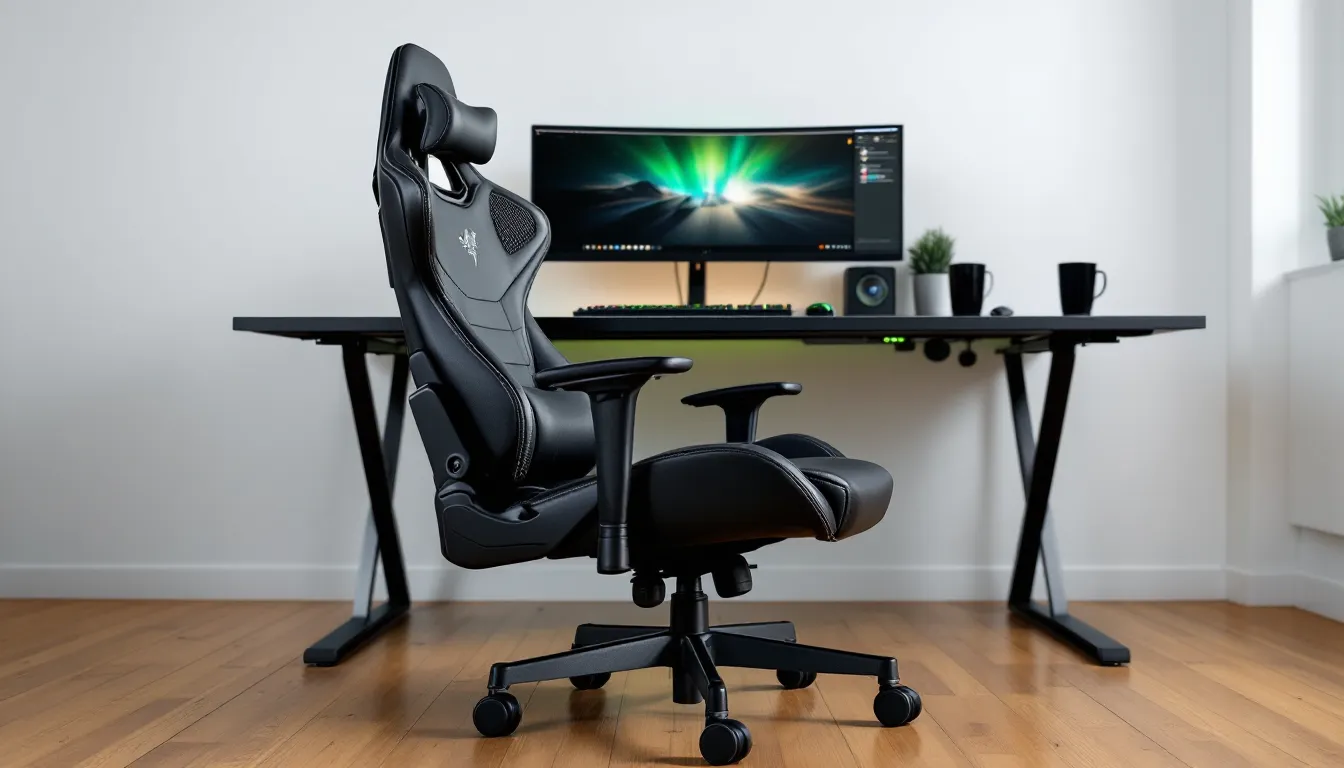
The Iskur sticks to the racing bucket seat aesthetic that defines the gaming chair category. It’s bold without tipping into garish, angular lines, subtle Razer snake logo embossed on the headrest, and clean contrast stitching that doesn’t scream “RGB explosion.”
The side bolsters are pronounced, keeping you locked in place without feeling restrictive. If you’re used to sprawling across a wide office chair, the snug fit takes adjustment. But for players who prefer structured support, especially during tense ranked matches, the wraparound design works.
At 21 inches wide at the seat base, it’s narrower than chairs like the Secretlab Titan XL, so larger builds might feel confined. Average-to-slender frames fit comfortably.
Color Options and Customization
As of 2026, Razer offers the Iskur in three colorways: classic Black, Black/Green (the signature Razer combo), and a newer Frost Edition with white and silver accents. No wild RGB integration here, this is one of Razer’s rare products that stays analog.
The headrest cushion is removable, held by elastic straps. Some users ditch it entirely, preferring the high-back support without the extra bulk. The armrests have rubberized tops that resist wear but can’t be swapped for alternate textures or materials.
Comfort and Ergonomics for Long Gaming Sessions
Adjustable Lumbar Support Curve
This is where the Iskur earns its reputation. The lumbar curve dial sits on the right side of the backrest, easily reachable while seated. Twist it forward, and the internal curve pushes into your lower back: twist it back, and it flattens.
During a six-hour session testing Elden Ring and competitive Valorant scrims, the adjustability let me shift posture without losing support. Leaning forward for clutch moments? Lumbar stayed engaged. Reclining between rounds? Support adapted without creating pressure points.
Players with existing lower back issues report mixed results. Some find the active support helps maintain posture and reduces fatigue. Others with specific injuries or conditions (like herniated discs) note the curve can press too aggressively if maxed out. The key is treating it as a dial, not a switch, small adjustments matter more than cranking it to the limit.
4D Armrests and Recline Features
The 4D armrests adjust in four directions: height, width, depth, and angle. They lock firmly into place without the wobble that plagues cheaper mechanisms. For FPS players, getting armrests positioned to support forearms without interfering with mouse movement is crucial, and the Iskur delivers the precision to dial that in.
The recline goes up to 139 degrees with a tilt-lock function. It’s smooth, controlled, and doesn’t feel like you’re going to tip backward. The recline tension is adjustable via a knob under the seat, though it’s somewhat stiff even on the loosest setting, great for preventing accidental lean-back during tense moments, less ideal if you want to rock gently while watching streams.
One quirk: the recline and lumbar support don’t interfere with each other mechanically, but if you recline past 130 degrees, the lumbar curve can feel more pronounced since your pelvis shifts angle. It’s not uncomfortable, just noticeable.
Seat Cushioning and Padding Quality
The seat cushion is firm. Uncomfortably firm for the first week, then breaks in to something supportive but not plush. If you’re coming from a soft mesh chair or a couch, expect an adjustment period. The firmness is intentional, it prevents the bottoming-out effect where cheap foam collapses and you end up sitting on the hard base.
The waterfall edge at the front of the seat reduces pressure on the back of your thighs, which helps circulation during long sessions. Taller players (over 6’2″) might find the seat depth (20 inches) slightly short, with less thigh support than chairs designed for larger frames.
Breathability is decent. The perforated sections along the backrest help, but prolonged sitting in a warm room will still generate heat buildup. It’s better than solid PU leather but not as cool as full mesh designs.
Assembly and Setup Experience
Assembly takes about 30 minutes solo, 15 if you’ve got a second pair of hands. Razer includes all necessary tools (Allen keys, bolts, washers) and a straightforward instruction manual with clear diagrams. The parts are labeled, and everything fits together without excessive force or alignment headaches.
The trickiest part is attaching the backrest to the seat base, you need to line up bolt holes while supporting the weight of the backrest. Once that’s secured, the rest is standard: attach armrests, mount the gas lift, click in the base and casters.
The lumbar mechanism comes pre-installed, so you don’t need to fiddle with internal components. Just bolt the frame together, adjust the settings to your preference, and you’re done. No major complaints here, Razer kept it simple.
Durability and Long-Term Performance
Frame and Base Construction
The steel-reinforced frame and aluminum alloy base inspire confidence. Early Iskur models (2020-2021) had occasional reports of gas lift failures after 18-24 months, but Razer addressed this in later production runs with upgraded Class-4 gas lifts. Units purchased in 2024 or later should have the improved component.
The casters are durable, though they do accumulate hair and debris in the wheel housing over time, standard maintenance issue across all chair types. A quick cleaning every few months keeps them rolling smoothly.
Razer backs the Iskur with a 3-year manufacturer’s warranty, covering defects in materials and workmanship. That’s standard for premium gaming chairs, matching Secretlab and DXRacer policies. Many of the top gaming hardware reviews in 2026 place warranty coverage as a key differentiator in this price bracket.
Upholstery Wear and Tear
After 18 months of daily use (8-10 hours per day), the synthetic leather shows minimal wear. Some light creasing appears on the seat where pressure is highest, but no cracking, peeling, or significant fading. The high-contact areas, armrest tops, seat bolsters, hold up better than expected.
The double-stitching remains intact with no fraying or separation. The lumbar mechanism continues to adjust smoothly without loosening or developing play in the dial. Overall durability feels consistent with the premium positioning.
Razer Iskur vs. Other Gaming Chairs
How It Compares to Secretlab Titan Evo
The Secretlab Titan Evo is the Iskur’s most direct competitor. Both sit in the $500-600 range, emphasize ergonomics over gimmicks, and target serious gamers willing to invest in comfort.
Key differences:
- Lumbar support: The Iskur’s internal curve system is more adjustable and integrated. The Titan Evo uses a magnetic lumbar pillow, effective but less customizable.
- Sizing options: Secretlab offers three size variants (Small, Regular, XL) to accommodate different body types. Razer offers one size, which fits best in the 5’6″ to 6’2″ range.
- Upholstery: The Titan Evo’s NEO Hybrid Leatherette and SoftWeave fabric options edge out the Iskur’s synthetic leather in breathability and texture.
- Recline: Titan Evo goes to 165 degrees vs. Iskur’s 139. If you nap in your chair, Secretlab wins.
For pure lumbar customization, the Iskur has the edge. For overall size flexibility and fabric options, the Titan Evo pulls ahead. Performance-wise, they’re neck-and-neck. Checking pro player settings reveals both chairs appearing in streamer and esports setups with roughly equal frequency.
Razer Iskur vs. Herman Miller X Logitech Embody
This is David vs. Goliath territory. The Herman Miller X Logitech Embody costs nearly double the Iskur ($1,500+ vs. $550-600) and comes from the office ergonomics world rather than gaming-first design.
Herman Miller advantages:
- Superior breathability with full pixelated back support and open mesh construction
- 12-year warranty vs. Razer’s 3-year
- Scientifically validated ergonomic design with pressure distribution technology
- More neutral aesthetic that fits professional home offices
Iskur advantages:
- Half the price (or less, depending on sales)
- Gaming-specific design language and branding
- More adjustable lumbar curve vs. Embody’s passive support
- Easier availability and faster shipping
If budget isn’t a constraint and you value long-term ergonomic investment over gaming aesthetics, the Embody is objectively superior. But for most gamers, the Iskur delivers 80% of the ergonomic benefit at 40% of the cost. That value gap matters.
Readers exploring options across different product categories can also look at comprehensive comparisons in gaming tech buying guides, which often weigh similar trade-offs between gaming-focused and ergonomic-first designs.
Who Should Buy the Razer Iskur?
The Iskur makes the most sense for:
- Players with lower back concerns who need active, adjustable lumbar support beyond what a pillow provides
- Competitive gamers spending 6+ hours daily in the chair and prioritizing posture maintenance
- Streamers and content creators who need a chair that looks good on camera while supporting marathon sessions
- Average-to-slender builds between 5’6″ and 6’2″, under 280 lbs
It’s less ideal for:
- Budget-conscious buyers who can find adequate ergonomics in the $300-400 range from brands like GTRACING or Corsair
- Larger frames over 6’2″ or 280 lbs, who need wider seats and deeper cushions (look at Secretlab Titan XL or DXRacer Tank series)
- Hot sleepers who overheat easily, full mesh alternatives offer better airflow
- Players who prefer plush, soft seating, the Iskur’s firmness is feature, not a bug, but it’s not for everyone
If the adjustable lumbar system solves a specific problem you’re dealing with (lower back fatigue, poor posture during long sessions), the premium is justified. If you’re just upgrading from a basic office chair and don’t have particular ergonomic needs, the cost might outpace the benefits.
Pricing and Value Proposition
As of March 2026, the Razer Iskur retails for $549.99 USD directly from Razer. Street prices occasionally dip to $499 during Black Friday or Prime Day sales. That positions it in the upper-mid tier of gaming chairs, cheaper than Herman Miller or Steelcase ergonomic thrones, pricier than budget gaming brands.
What you’re paying for:
- Integrated, adjustable lumbar support system (primary value add)
- Premium materials and construction rated for long-term use
- Razer brand tax (yes, it exists, you’re paying partly for the logo)
- 3-year warranty and customer support
What you’re not getting:
- Multiple size options or extensive customization
- Luxury fabric upgrades (real leather, premium weaves)
- Cutting-edge features like built-in heating/cooling or massage
Compared to chairs in the same price bracket, the Iskur competes well on build quality and lumbar innovation but lags slightly on size inclusivity and material variety. The value proposition hinges on whether the lumbar system addresses a need you actually have. If it does, it’s a solid investment. If generic lumbar pillows work fine for you, paying $550 for the Iskur’s signature feature doesn’t pencil out.
Pros and Cons Summary
Pros:
- Fully adjustable internal lumbar curve that actually works
- Solid build quality with steel frame and aluminum base
- 4D armrests with precise, stable adjustments
- Durable synthetic leather with minimal wear after extended use
- Clean, professional aesthetic that fits most setups
- Firm cushioning that resists flattening over time
Cons:
- Firm seat requires a break-in period and won’t suit everyone
- Single size doesn’t accommodate larger or taller frames well
- Pricier than many competitors without offering premium fabric options
- Recline maxes out at 139 degrees (fine for gaming, limiting for naps)
- Breathability is decent but not exceptional, gets warm in hot environments
- Razer brand premium adds cost without functional benefit
Conclusion
The Razer Iskur delivers on its core promise: a gaming chair with genuinely innovative lumbar support that goes beyond the pillow-and-pray approach most competitors rely on. It’s built to last, adjusts in all the ways that matter, and holds up through the kind of marathon sessions that separate casual players from the grind-it-out crowd.
But it’s not a universal solution. The single size, firm cushioning, and premium price mean it works best for a specific user profile, players who need active ergonomic support and fit within the chair’s design parameters. If you’re in that sweet spot, the Iskur justifies the investment. If you’re outside it, better-fitting options exist at similar or lower price points.
In 2026, the gaming chair market is more competitive than ever, but the Iskur’s lumbar system remains one of the most thoughtful ergonomic implementations you’ll find without jumping to Herman Miller territory. That alone keeps it relevant.